Open and log
Pick an emoji and you're done.
Mood journal for iPhone
Log how you feel in two taps. After a few weeks the calendar shows what lifts your mood and what drags it down.
How it works
Log your mood in seconds and get on with your day.
Pick an emoji and you're done.
A whole month on one screen.
See what moves your mood.
Patterns
After a few weeks the calendar stops being a list and becomes a portrait.
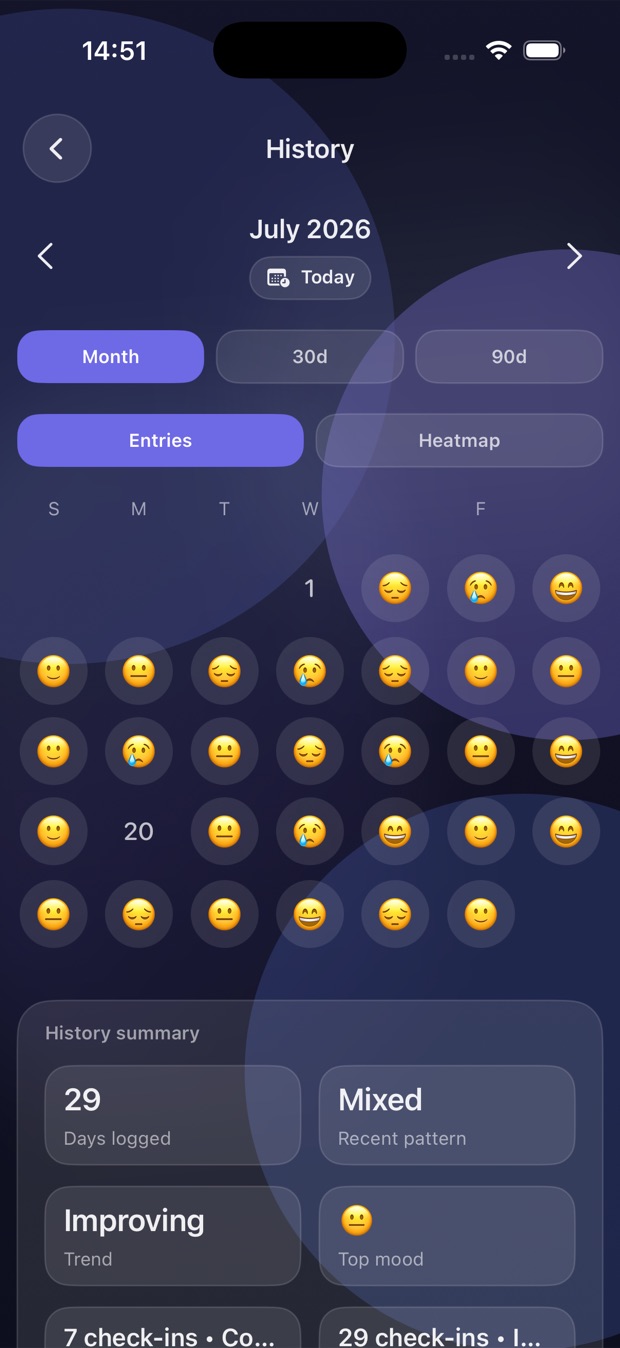
Every day becomes an emoji on the calendar, with no chart to read.
The summary says whether the week is improving or slipping, and which mood repeats.
Tap any day to see the note and what you marked as the cause.
Privacy
No ads, and nobody here reading your entries.
Everything is encrypted on your phone.
Syncs through your account, not ours.
No analytics, pixels, or third-party services.
Common questions
It is. No ads and no in-app purchase.
We have no server. Entries stay on your phone and, if you turn iCloud on, in your own Apple account.
No. Open the app and start logging.
It uses the Apple ID already on the device. If you are not signed in to iCloud, the app keeps working on local data alone.
Step count and active energy, and only if you allow it. It uses them to line movement up against mood. You grant that in the system sheet, not in a switch of ours.
Yes. You can export to CSV or JSON, picking everything, the last 30 days or the last 90.
Brazilian Portuguese, English and Spanish. It follows the device language and you can change it inside the app.
Not yet. Pausar ships for iPhone and iPad first.
iPhone and iPad first.